mod
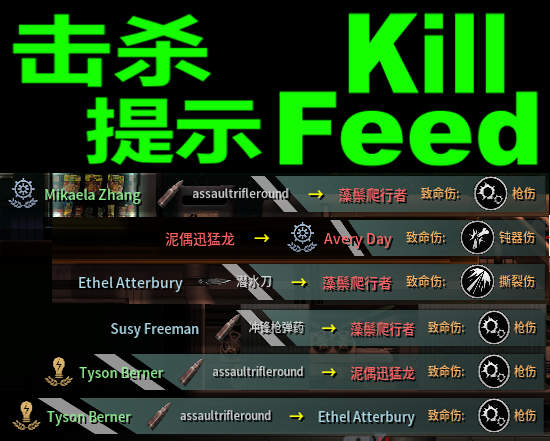
[MsCok]击杀提示 Kill Feed
--你需要安装客户端LuaCs 并且开启C#功能 --You need to install the client LuaCs And enable C # functionality 反馈QQ群:883992390 =====这个mod会在屏幕右上角添加击杀提示===== --显示 击杀人职业 击杀人名字 装备的物品 死者职业 死者名字 致命伤 --延迟一段时间后自然消失 --鼠标悬停时可暂停自然消失的倒计时 =====UI设置命令/文件===== --可以手动修改-- -设置文件放置在 Barotrauma\ModSettings\MsCookieSMod\Kill_Feed.xml...
- Latest version
- no release indexed
- Downloads
- 1.4k
- Rating
- 125
- Updated
- 28 d ago
- Available on
- Steam Workshop
Download
Delivered through the Steam client, not a file this page can link to.
Frequently asked
How do I install [MsCok]击杀提示 Kill Feed?
Install the matching loader first, then put the downloaded file in your mods folder and start the game. The loader, the mod and Barotrauma all have to be on the same version, which is the usual reason a mod does not appear in game.
Where do I download [MsCok]击杀提示 Kill Feed safely?
From the author's own page on Steam Workshop, which is where the data here is synced from. IndexGG never mirrors, re-hosts or repackages a file: every download button points at the original source, so you get exactly what the author published.
Which Barotrauma versions does [MsCok]击杀提示 Kill Feed work on?
The author has not declared a supported version in the metadata we sync, so there is nothing here we can state as fact. Check the project's own page before installing it, and treat an old mod with no declared version as untested on modern Barotrauma.