mod
RPG Quality Grades (Color)
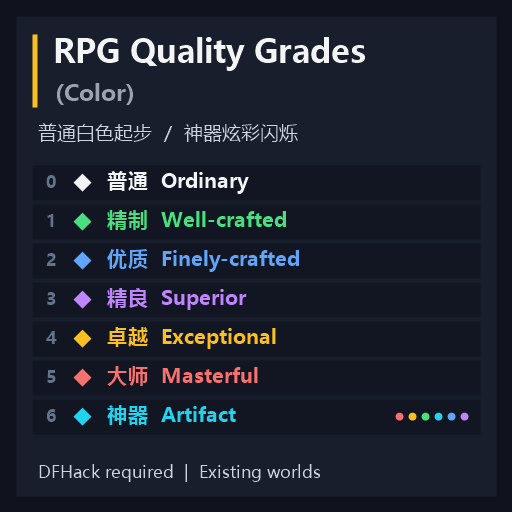
RPG Quality Grades (Color) 为物品名称添加 RPG 风格的品质颜色,一眼区分好坏。保留原有品质符号,不修改物品属性或存档数据。 七档品质 普通:白色 精制:绿色 优质:蓝色 精良:紫色 卓越:金色 大师:红色 神器:炫彩闪烁;关闭动画后为青色 神器名称循环变色并伴随亮度起伏。原创书籍在游戏中也属于神器,因此同样使用神器效果。 安装 需要启用 DFHack。 订阅并等待下载完成,完整退出并重启游戏,载入世界后自动启用。支持已有世界,无需重新生成世界或在世界生成时激活模组。 常用设置 在 DFHack 窗口输入 quality-colors,可查看完整命令说明。使用...
- Latest version
- no release indexed
- Downloads
- 213
- Rating
- 10
- Updated
- 10 d ago
- Available on
- Steam Workshop
Download
Delivered through the Steam client, not a file this page can link to.
Frequently asked
How do I install RPG Quality Grades (Color)?
Install the matching loader first, then put the downloaded file in your mods folder and start the game. The loader, the mod and Dwarf Fortress all have to be on the same version, which is the usual reason a mod does not appear in game.
Where do I download RPG Quality Grades (Color) safely?
From the author's own page on Steam Workshop, which is where the data here is synced from. IndexGG never mirrors, re-hosts or repackages a file: every download button points at the original source, so you get exactly what the author published.
Which Dwarf Fortress versions does RPG Quality Grades (Color) work on?
The author has not declared a supported version in the metadata we sync, so there is nothing here we can state as fact. Check the project's own page before installing it, and treat an old mod with no declared version as untested on modern Dwarf Fortress.