mod
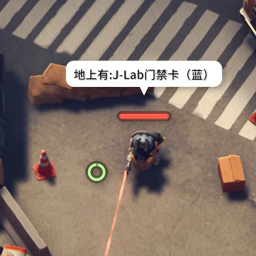
根据设置的目标物品,搜索场景中的物品并在地图上标识
检查地面上的东西,如果发现门卡,钥匙或者皇冠,就输出文字。 加入了地图的标识,那就可以通过小地图找到对应的物品了。 第一次搞这些东西,都是根据各个大神的Mod摸石头过河的,请多包涵。 Github: # Changes Logs 2026-08-16 - 修复拾取物品后,物品仍然在地图上显示的Bug。 2026-08-14 - 新增箱子 / 柜子战利品扫描(反射读取 `Loot Box Inventories`)。 - 新增 F9 物品选择配置窗口:搜索、勾选、翻页,最多 20 种,支持中文显示。 - 物品选择通过 PlayerPrefs 持久化,首次运行默认勾选 10 件高价值物品。...
- Latest version
- no release indexed
- Downloads
- 1.0k
- Rating
- 40
- Filed under
- Mod
- Updated
- 3 mo ago
- Available on
- Steam Workshop
Download
Delivered through the Steam client, not a file this page can link to.
Frequently asked
How do I install 根据设置的目标物品,搜索场景中的物品并在地图上标识?
Install the matching loader first, then put the downloaded file in your mods folder and start the game. The loader, the mod and Escape from Duckov 逃离鸭科夫 all have to be on the same version, which is the usual reason a mod does not appear in game.
Where do I download 根据设置的目标物品,搜索场景中的物品并在地图上标识 safely?
From the author's own page on Steam Workshop, which is where the data here is synced from. IndexGG never mirrors, re-hosts or repackages a file: every download button points at the original source, so you get exactly what the author published.
Which Escape from Duckov 逃离鸭科夫 versions does 根据设置的目标物品,搜索场景中的物品并在地图上标识 work on?
The author has not declared a supported version in the metadata we sync, so there is nothing here we can state as fact. Check the project's own page before installing it, and treat an old mod with no declared version as untested on modern Escape from Duckov 逃离鸭科夫.