mod
LikeItemFind(标记物品查找)
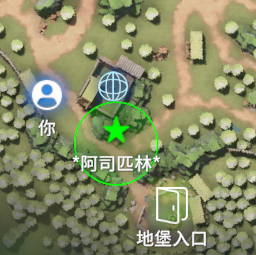
标记物品以后,可以在地图上标记出对应的位置 在物品上按N标记,进图以后按M打开地图,会显示你标记物品在地图上的位置跟名字。不管是箱子里的物品还是地面上的掉落物都会显示出来。 还加了一个功能按一下键盘左边的alt键,在打开地图会显示该地图上高价值的物品位置,再按一下alt键可以关闭高价值物品显示(高价值物品判断差不多是大红之类) 虽然C#很熟悉但是mod还是第一次写。一些代码api还是参考了创意工坊的大佬们,中间还用ai分析过代码,感谢大佬们写的api跟mod。总之东拼西凑写出了这个mod,可能会有些性能问题,或者一些bug问题。还有一些mod,我没有测试过兼容性,可能会有冲突。欢迎留言反...
- Latest version
- no release indexed
- Downloads
- 8.8k
- Rating
- 409
- Filed under
- Mod
- Updated
- 12 mo ago
- Available on
- Steam Workshop
Download
Delivered through the Steam client, not a file this page can link to.
Frequently asked
How do I install LikeItemFind(标记物品查找)?
Install the matching loader first, then put the downloaded file in your mods folder and start the game. The loader, the mod and Escape from Duckov 逃离鸭科夫 all have to be on the same version, which is the usual reason a mod does not appear in game.
Where do I download LikeItemFind(标记物品查找) safely?
From the author's own page on Steam Workshop, which is where the data here is synced from. IndexGG never mirrors, re-hosts or repackages a file: every download button points at the original source, so you get exactly what the author published.
Which Escape from Duckov 逃离鸭科夫 versions does LikeItemFind(标记物品查找) work on?
The author has not declared a supported version in the metadata we sync, so there is nothing here we can state as fact. Check the project's own page before installing it, and treat an old mod with no declared version as untested on modern Escape from Duckov 逃离鸭科夫.