mod
资源计算器
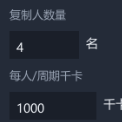
- 游戏左下角工具栏会有一个**深红褐色入口按钮**(可拖动,点一下打开面板)。 - 或随时按 **Ctrl + Shift + R** 开关面板。 - 打开后按 **ESC** 关闭。 - 面板打开时滚轮只作用于面板内部,不再穿透到游戏画面。 面板分两个 Tab:**食物计算** 与 **火箭最优配置**。 --- 一、食物计算 ①输入复制人数量,自动算出「要种多少、需要多少资源」。 - 点选某个食物,右侧即显示它的需求与种植方案。 - 程序按 **1000 千卡 / 人 · 周期** 自动换算总热量需求,再反推需要多少株作物。 ② 生长加成(可选开关) 把你正在用的增产手段勾上,结果...
- Latest version
- no release indexed
- Downloads
- 538
- Rating
- 21
- Updated
- 3 mo ago
- Available on
- Steam Workshop
Download
Delivered through the Steam client, not a file this page can link to.
Frequently asked
How do I install 资源计算器?
Install the matching loader first, then put the downloaded file in your mods folder and start the game. The loader, the mod and Oxygen Not Included all have to be on the same version, which is the usual reason a mod does not appear in game.
Where do I download 资源计算器 safely?
From the author's own page on Steam Workshop, which is where the data here is synced from. IndexGG never mirrors, re-hosts or repackages a file: every download button points at the original source, so you get exactly what the author published.
Which Oxygen Not Included versions does 资源计算器 work on?
The author has not declared a supported version in the metadata we sync, so there is nothing here we can state as fact. Check the project's own page before installing it, and treat an old mod with no declared version as untested on modern Oxygen Not Included.