mod
橙子聊天气泡 | 可选聊天外观扩展
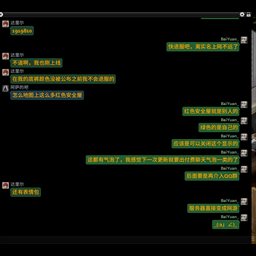
橙子聊天气泡 Orange Chat Bubbles 适用于 Project Zomboid Build 42.20 的可选客户端聊天外观扩展。必须同时启用“橙子智能聊天 Orange Smart Chat”。只需要自动换行的玩家无需安装本项目。 微信式头像气泡布局 自己的 Steam 头像和消息靠右,其他玩家的 Steam 头像和消息靠左。 昵称独立显示在气泡上方,正文不重复显示昵称前缀。 紧凑的 24 小时制 HH:mm 时间戳与昵称位于同一行,不占消息正文宽度。 时间戳使用气泡 Mod 自己的默认开启选项,不再受 Smart Chat 旧设置影响;兼容消息缺少时间字段时会固定使用首...
- Latest version
- no release indexed
- Downloads
- 2.2k
- Rating
- 6
- Updated
- 2 mo ago
- Available on
- Steam Workshop
Download
Delivered through the Steam client, not a file this page can link to.
Frequently asked
How do I install 橙子聊天气泡 | 可选聊天外观扩展?
Install the matching loader first, then put the downloaded file in your mods folder and start the game. The loader, the mod and Project Zomboid all have to be on the same version, which is the usual reason a mod does not appear in game.
Where do I download 橙子聊天气泡 | 可选聊天外观扩展 safely?
From the author's own page on Steam Workshop, which is where the data here is synced from. IndexGG never mirrors, re-hosts or repackages a file: every download button points at the original source, so you get exactly what the author published.
Which Project Zomboid versions does 橙子聊天气泡 | 可选聊天外观扩展 work on?
The author has not declared a supported version in the metadata we sync, so there is nothing here we can state as fact. Check the project's own page before installing it, and treat an old mod with no declared version as untested on modern Project Zomboid.