mod
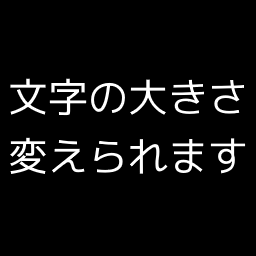
日本語のフォントサイズを変更可能にするMOD(Japanese font size fix mod)
日本語のフォントサイズ変更を可能にするMODです(画像参照)。 「文字が小さすぎて困っている」という人にオススメです。 本MODをサブスクライブしてゲーム内で有効化すると、画面設定にある以下項目がフォントサイズの設定として反映されるようになります。 ・「フォントサイズ」 ・「コンテキストメニューのフォントサイズ」 ・「インベントリのフォントサイズ」 ・「ツールチップのフォントサイズ」 シングルプレイ、マルチプレイでの適用方法について知りたい方は以下もご参考ください。 Project Zomboidで文字の大きさを変えられるMODを公開しました 注意事項 ・MODのサブスクライブだけでは有...
- Latest version
- no release indexed
- Downloads
- 15.0k
- Rating
- 518
- Updated
- 5 y ago
- Available on
- Steam Workshop
Download
Delivered through the Steam client, not a file this page can link to.
Frequently asked
How do I install 日本語のフォントサイズを変更可能にするMOD(Japanese font size fix mod)?
Install the matching loader first, then put the downloaded file in your mods folder and start the game. The loader, the mod and Project Zomboid all have to be on the same version, which is the usual reason a mod does not appear in game.
Where do I download 日本語のフォントサイズを変更可能にするMOD(Japanese font size fix mod) safely?
From the author's own page on Steam Workshop, which is where the data here is synced from. IndexGG never mirrors, re-hosts or repackages a file: every download button points at the original source, so you get exactly what the author published.
Which Project Zomboid versions does 日本語のフォントサイズを変更可能にするMOD(Japanese font size fix mod) work on?
The author has not declared a supported version in the metadata we sync, so there is nothing here we can state as fact. Check the project's own page before installing it, and treat an old mod with no declared version as untested on modern Project Zomboid.