mod
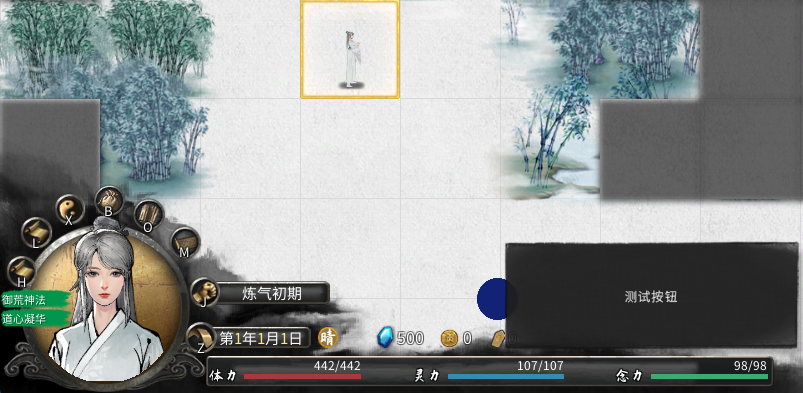
<size=18><b><color=#8B0000>【叶落埃】</color></b></size>大地图按钮示例2:图片
1.该模组涉及资源修改及代码修改,如需更改按钮图片,需下载unity的2020.3.9f1或2020.3.9f1c1版本进行修改,对比上一个示例,额外演示按钮悬浮提示文本框及按钮图标添加方法,并简化步骤和代码; 2.点击按钮会弹出未传入数据的商店购买界面ui,仅为简单示例如何通过点击按钮打开某个ui界面。 **********本次更新说明********** 原则上不在此mod上继续更新,避免后续代码过多导致阅读困难。
- Latest version
- no release indexed
- Downloads
- 105
- Rating
- 1
- Updated
- 15 mo ago
- Available on
- Steam Workshop
Download
Delivered through the Steam client, not a file this page can link to.
Frequently asked
How do I install <size=18><b><color=#8B0000>【叶落埃】</color></b></size>大地图按钮示例2:图片?
Install the matching loader first, then put the downloaded file in your mods folder and start the game. The loader, the mod and 鬼谷八荒 Tale of Immortal all have to be on the same version, which is the usual reason a mod does not appear in game.
Where do I download <size=18><b><color=#8B0000>【叶落埃】</color></b></size>大地图按钮示例2:图片 safely?
From the author's own page on Steam Workshop, which is where the data here is synced from. IndexGG never mirrors, re-hosts or repackages a file: every download button points at the original source, so you get exactly what the author published.
Which 鬼谷八荒 Tale of Immortal versions does <size=18><b><color=#8B0000>【叶落埃】</color></b></size>大地图按钮示例2:图片 work on?
The author has not declared a supported version in the metadata we sync, so there is nothing here we can state as fact. Check the project's own page before installing it, and treat an old mod with no declared version as untested on modern 鬼谷八荒 Tale of Immortal.